
I own a Lenovo Legion — 15ACH6 laptop. It's past warranty period.
I also have posted about the term Legion.
This is most likely a defect from Lenovo in the overall interconnected Ryzen (AMD) processor ⇄ Radeon GPU (onboard) ⇄ NVIDIA GPU ⇄ power management.
My Lenovo Flex 5 — also post-warranty — with Intel processor, this blank never happened. Well, somewhere within the dual GPUs management perhaps was the culprit, possibly. Flex 5 has one GPU.
I mean, usually manufacturers don't deliberately put subroutines to make the customers defecate masonry, right? Right?
🤔
Right.
Indeed, it is a bug. Aside from the fact that this blank screen appeared conveniently when the warranty period was ended.
This is the laptop being awkwardly "dead". ⬇️

It was not off. The laptop was ON. The fans were running, the LED indicator on the power button was ON, it was ON. But the screen was blank, nothing was shown.
I use the "flip to boot" setting for my laptop. For both my Lenovo laptops.
Solution
An undocumented method to "power drain reset".
- Unplug ALL connected external peripherals like USB devices, HDMI, power charger, and so forth. Make sure to unplug the power from the laptop.
-
Press the power button and hold for 60 seconds. Use stopwatch or something similar to make sure it is done in 60 seconds. 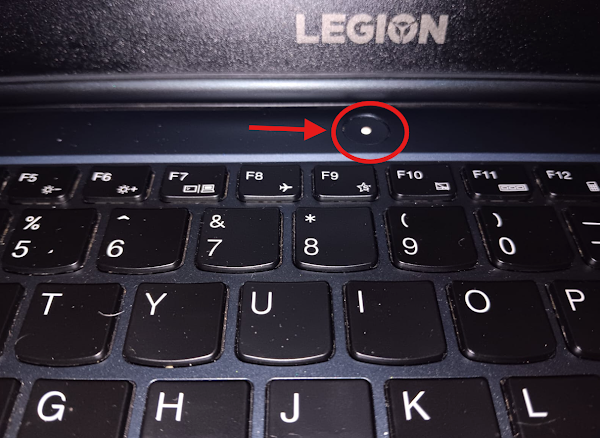
- Release the power button after 60 seconds.
- Plug 🔌 the power ⚡ back to the laptop.
- Press the power button like we turn on the laptop normally.
-
The laptop should do this sequence of events if the reset succeeds: - Showing LED animation on the keyboard. ☑️
- Followed by "LEGION" splash on the screen. ☑️
- Boot normally. ☑️
-
We can enter the operating system. ✅

Prior to the Method Above
This blank screen happened more than thrice (post-warranty), above was the latest. Before that method, I did force-restart multiple times like a plonker. It worked, eventually.
But then, I realised that it is rather odd to do similar thing and expect a different outcome. Must be a way to reset it properly. I thought — Hm, let me unplug the battery, then? — On second thought. — Eh, no.
And there you go, the 60 seconds power button press.
Maintenance
I did check and recheck anything dubious afterwards. NOTHING was peculiar. So I guess — here's my guess — AFTER we properly reset the laptop with either method: the naturally daft method or the power drain method — the entire software (OS / BIOS / etc.) state would also be reset to its working state. Thus, NOTHING would seem peculiar afterwards! Unless we rummage through Windows 11 boot log like a psychopathic accountant. Which in my case, I didn't enable it. Very comical. —
Oh, no log. Enable it, then? No.
ntbtlog.txt [...]
From my blank screen experiences, there were no observable generic patterns. Well, I only had a handful of samples. And the blanks happened at bloody arbitrary chances. Could not recreate it on purpose.
The latest event above was I let the laptop on for more than twelve hours, but then I turned that off normally — I never used sleep deliberately, always shut down. Then the next day, BLANK.
Another time I didn't turn on the laptop for days, then when I turned it on — BLANK.
Other couple of times I just used the laptop normally, then BLANK on startup.
All of those blanks happened post-warranty.
Before that, NO BLANKS. Indeed!
Marvellous.
So, setting the jest aside, it may be related to the onboard GPU and NVDIA GPU being subject to irregularity with the power management — AMD style, a tiny mishap which Lenovo didn't quite get it right, I suppose.
But happened AFTER the warranty had expired.
I guess it was merely coincidence. I guess.
🤔 Interesting guess, that.
Therefore — well, at least — we have the antidote if that happens again.
Thanks for visiting. 👋